

One workflow, not five disconnected tools.
Find what matters, understand it fast, analyse what deserves it, manage it in one place and stay updated. Each step hands its result to the next — and you can reach the same intelligence from the tools you already use.
Scout / Find
Companies, founders, technologies, experts and markets.Quick Research
Every candidate placed in the same structure, and flagged.Extended Research
Market, technology, competition, risk — with the evidence.Cockpit
One comparable view of everything you have looked at.Watchlists
Saved runs keep a topic or a company alive.Describe the problem. Get the market.
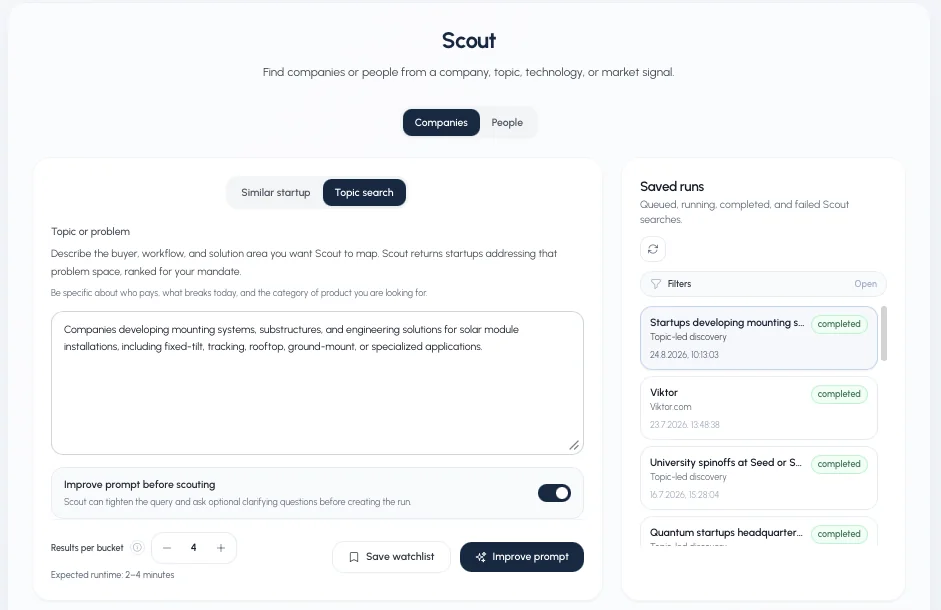
Scout maps a problem space rather than matching a keyword. Describe who pays, what breaks today and the category you are after — evalue8 can tighten that prompt and ask clarifying questions before it runs, then returns companies ranked for your mandate in two to six minutes.
- CompaniesBy topic and problem space, or by starting from one you already know.
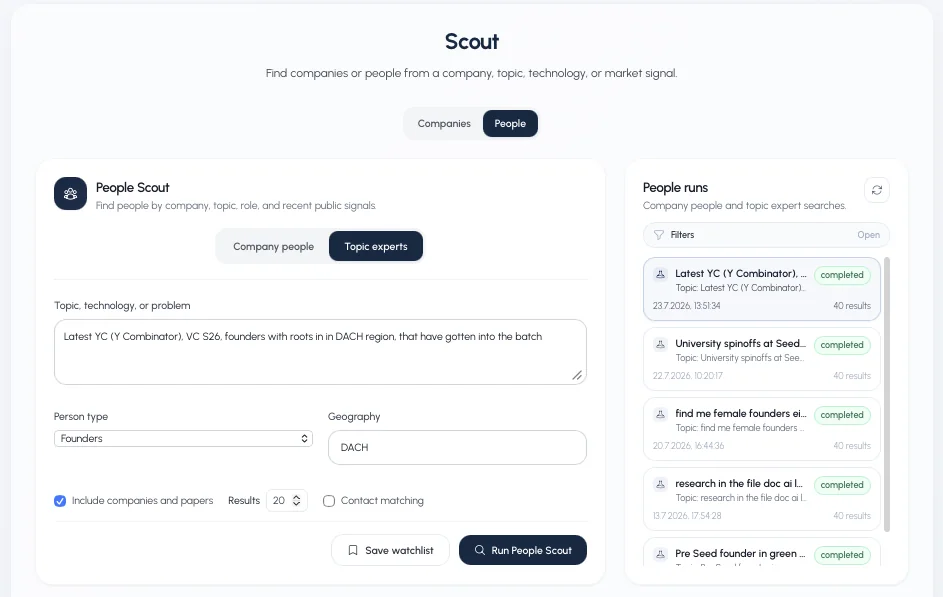
- Founders and expertsPeople Scout finds company people or topic experts, filtered by person type, geography and recent public signals — with contact matching.
- Technologies and marketsApproaches, methods and the players around them, not a category tag.
- Saved runs and watchlistsKeep a search alive and come back to what changed.
Understand a company in under a minute
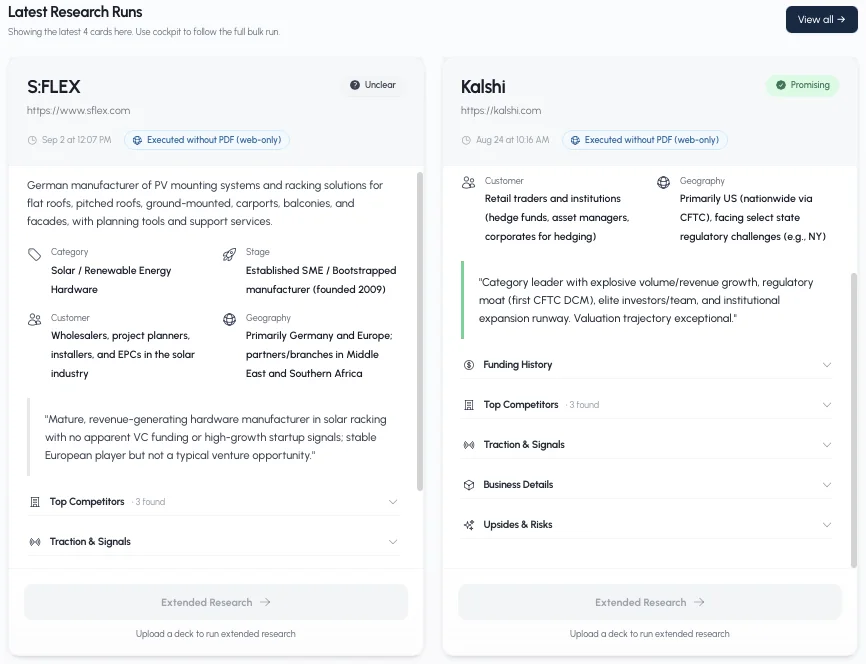
Ten seconds to a minute per company: what they offer, who buys, where they are, what traction is visible, who competes, and what the upsides and risks look like. Each one comes back flagged, so a long list becomes a short one without anyone reading a hundred websites.
- The same fields every timeCategory, stage, customer, geography, business model — comparable across the whole list.
- A verdict with its reasoningPromising, unclear or off-scope, each with the sentence that explains the call.
- Data gaps namedWhat could not be established is written down rather than filled in.
A four-to-six-minute due diligence review
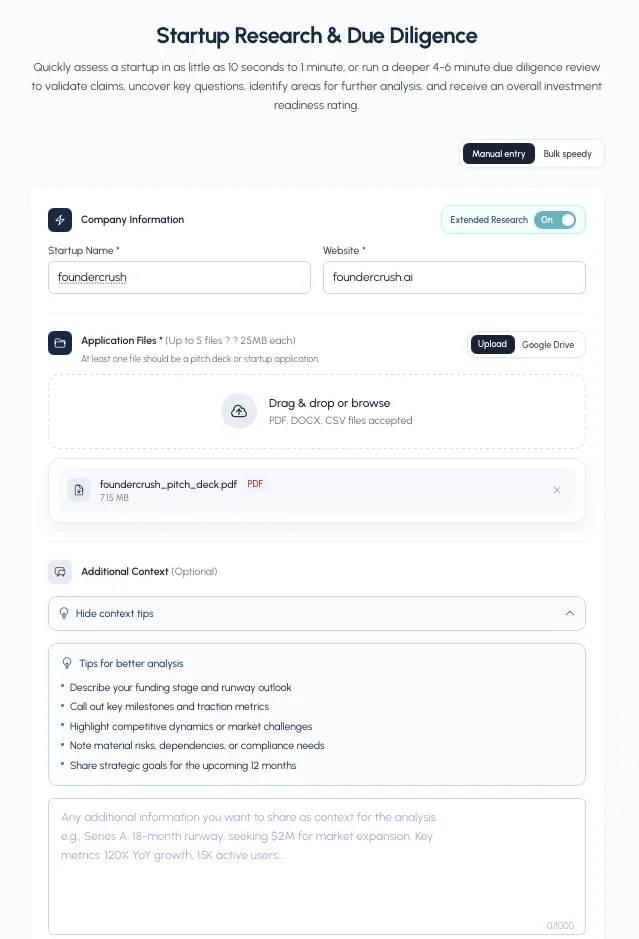
Add a pitch deck, an application or a vendor document — from your machine or straight from Google Drive — and evalue8 validates the claims in it, maps the competitive landscape, surfaces the risks and returns the questions worth asking.
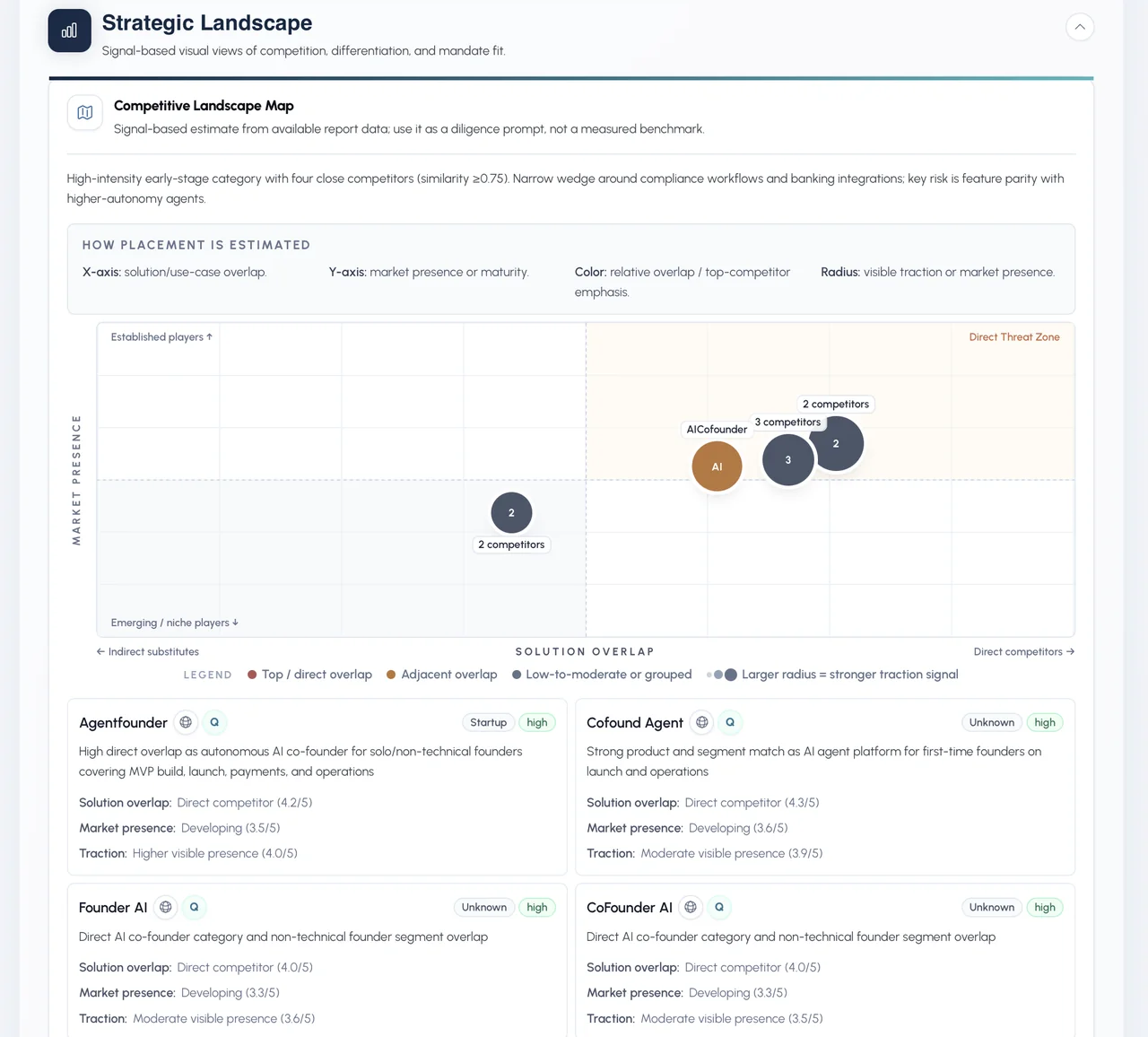
- Strategic landscapeCompetitors placed by solution overlap and market presence, including the ones outside your category.
- Signals & risksPositive signals and risk factors side by side, each traceable.
- Diligence prioritiesFocus areas to reach a decision, each with the specific questions to ask.
- Defensibility radarDifferentiation, technology, market, team and moat — interpretive, signal-based, labelled as such.
Up to five files, 25 MB each. Bulk mode runs a whole batch at once.
Every assessment traces back to a source
This is what separates a research system from a chat window. A claim does not stand because the model wrote it — it stands because something else says so, and you can open that something.
A statement from a document or the market
Taken out of the pitch deck, the vendor page or the application.Checked against independent sources
Supported, likely true, insufficient, likely false or contradicted.Graded, not just counted
Evidence strength, identity confidence, official source and relevance.Openable
The evidence trail lists what was used, so anyone can check the reasoning.
Argue with the report, in the report
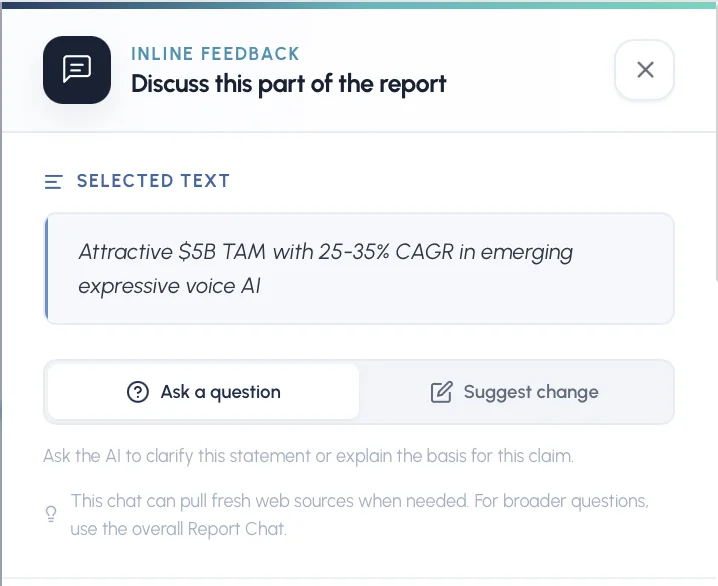
Select any statement and ask the AI to explain the basis for it, or suggest a change. The chat can pull fresh web sources for that specific line, and there is a report-wide chat for broader questions.
- Ask a question"Where does this number come from?" — answered against the sources behind that sentence.
- Suggest changeCorrect or sharpen a statement with what you know and the report does not.
- Human approval stays in the workflowThe analysis is a draft your team edits, not a verdict it has to accept.
What we do not claim
Not "AI you can trust". Everything comes from public sources and the documents you release; where the evidence is thin the output says so, and the scoring is interpretive and labelled that way on screen.
Everything you have looked at, in one comparable view
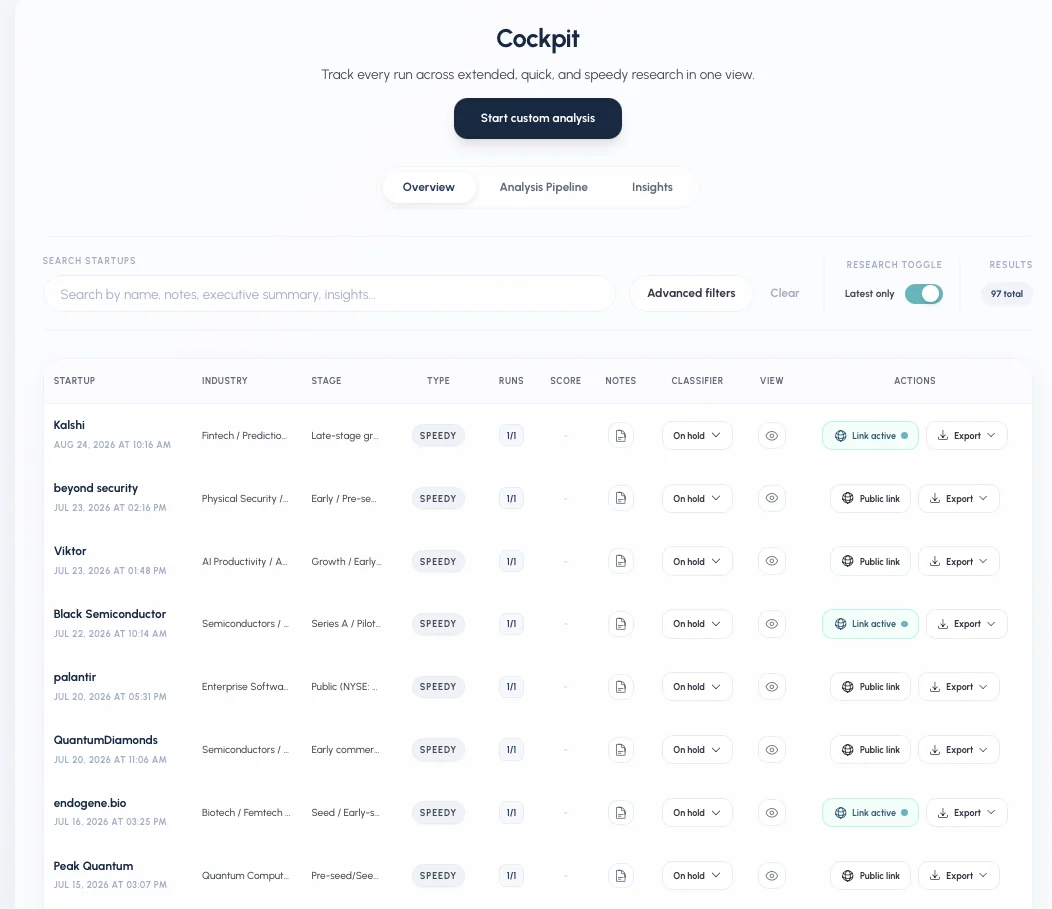
Not a folder of documents. Every run across speedy, quick and extended research in one searchable table — with notes, classification, a shareable public link and export to PDF, JSON or Excel.
- Compare on the same fieldsBecause every company was analysed into the same structure.
- Classify and hand overMark where something stands, share a link, export the report into your own document.
- Stay updatedWatchlists and saved runs keep a market or a company alive between reviews.
What evalue8 reads — and what it does not
Source grading
Claim checking
It does not see inside companies. Revenue that is not public we will not invent — it appears as a data gap instead. Security & privacy overview
Your intelligence. Where you already work.
evalue8 should not become another isolated tool to maintain. Use it as your intelligence operating system — or connect the layer underneath it to the systems you already run on.
Work in evalue8
Scout, Quick and Extended Research and Cockpit in one place, with the whole pipeline comparable.
app.evalue8.aiWork in your AI tools
Reach evalue8 research from the AI environment you already work in, without leaving it.
Claude · CodexWork in your own systems
Bring evalue8 intelligence into internal tools, automations and custom workflows.
REST APIWork in the tools you have
Pull documents in and push results out to the systems your team already uses.
Google Drive · Attioevalue8 as your operating system
Run the whole intelligence workflow inside the platform — discovery, screening, analysis, pipeline and tracking in one view.
evalue8 as your intelligence layer
Keep the databases, CRM and tools you have, and bring evalue8 structured research into them.
Same engine, four workflows
Source, screen, diligence
Founder and company discovery, investor-fit screening, claim validation, IC-ready exports.
For investorsCorporate InnovationMarkets and technologies
From a problem to approaches, technologies, providers and experts.
For innovation teamsAcceleratorsApplications and pipeline
Systematic research plus expert judgement, and scouting for what never applied.
For programsFoundersMarket, self, investors
Understand your market, see yourself as investors will, find the ones that fit.
For founders